
Here are the scripts (Bash, Python and Tcl/Tk) to get this done
First the Python3 & packages…
sudo apt install python3-pip
sudo apt install python3-tk
sudo apt install python3-pygame
Then we need the sound-effects, let’s put them in Share/Audio-Samples
ls
air-horn-freesound_community-dj-airhorn-sound-39405.mp3
cheer-dragon-studio-crowd-cheer-and-applause-406644.mp3
ding-freesound_community-ding-101492.mp3
magic-universfield-magic-03-278824.mp3
singingBowl-soundreality-bell-fx-410608.mp3
Now for the bash script to launch the app ( sound-effects.sh )
python3 sound-effects.pyRemember to change the script to be executable: chmod +x sound-effects.sh
And finally the script itself ( sound-effects.py )
import tkinter as tk
import pygame

def play_air_horn():
    try:
        pygame.mixer.music.load("Share/Audio-Samples/air-horn-freesound_community-dj-airhorn-sound-39405.mp3")
        pygame.mixer.music.play()
        print("Playing audio file...")
    except pygame.error as e:
        print(f"Could not load audio file: {e}")
def play_cheer():
    try:
        pygame.mixer.music.load("Share/Audio-Samples/cheer-dragon-studio-crowd-cheer-and-applause-406644.mp3")
        pygame.mixer.music.play()
        print("Playing audio file...")
    except pygame.error as e:
        print(f"could not load audio file: {e}")
def play_ding():
    try:
        pygame.mixer.music.load("Share/Audio-Samples/ding-freesound_community-ding-101492.mp3")
        pygame.mixer.music.play()
        print("Playing audio file...")
    except pygame.error as e:
        print(f"could not load audio file: {e}")
def play_magic():
    try:
        pygame.mixer.music.load("Share/Audio-Samples/magic-universfield-magic-03-278824.mp3")
        pygame.mixer.music.play()
        print("Playing audio file...")
    except pygame.error as e:
        print(f"could not load audio file: {e}")
def play_bell():
    try:
        pygame.mixer.music.load("Share/Audio-Samples/singingBowl-soundreality-bell-fx-410608.mp3")
        pygame.mixer.music.play()
        print("Playing audio file...")
    except pygame.error as e:
        print(f"could not load audio file: {e}")


# Rest of the code remains the same
root = tk.Tk()
pygame.mixer.init()

button = tk.Button(root, text="Air Horn", command=play_air_horn).grid(row=0)
button = tk.Button(root, text="Cheer", command=play_cheer).grid(row=1)
button = tk.Button(root, text="Ding", command=play_ding).grid(row=2)
button = tk.Button(root, text="Magic", command=play_magic).grid(row=3)
button = tk.Button(root, text="SingingBowl bell", command=play_bell).grid(row=4)
#button.pack(pady=20)

root.mainloop()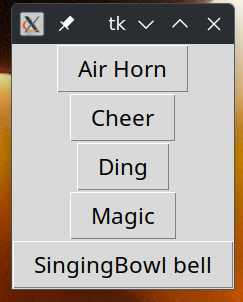
Not the prettiest code, but in its simplicity it gets the point across — I wrote this to my wife trying to beat a five minute timer…
You can launch the script, a window will pop up, with five buttons for the five sound effects. You can drag and drop the window to another screen, go on zoom, and just click on a sound effect when needed. The “app” does not consume multiple threads or lots of memory, you can let it run forever. If you need to suddenly stop a sound effect, just kill the app, by pressing the “X.” The key features of this exercise was that the dialog had to be small and moveable, and the buttons/effects must be immediate (no loading programs).
Nice enhancements:
- Automatically build the list of buttons from the files in the directory
- Have a stop button without having to kill the app
- Have the window sizing
This is a replacement solution to my wifes Elgato/StreamDeck solution that seems to launch an uncountable number of threads slowing her i9/32GB machine to a crawl. This solution only uses one single thread and a minuscule amount of RAM, yet it works faster.
Alternate title: Zoom call sound effects